
15.1. 情感分析及数据集
随着在线社交媒体和评论平台的快速发展,大量评论的数据被记录下来。这些数据具有支持决策过程的巨大潜力。 情感分析(sentiment analysis)研究人们在文本中 (如产品评论、博客评论和论坛讨论等)“隐藏”的情绪。 它在广泛应用于政治(如公众对政策的情绪分析)、 金融(如市场情绪分析)和营销(如产品研究和品牌管理)等领域。
由于情感可以被分类为离散的极性或尺度(例如,积极的和消极的),我们可以将情感分析看作一项文本分类任务,它将可变长度的文本序列转换为固定长度的文本类别。在本章中,我们将使用斯坦福大学的
import os
import mindspore
import numpy as np
from mindspore import nn
from d2l import mindspore as d2l
import os
import torch
from torch import nn
from d2l import torch as d2l
15.1.1. 读取数据集
首先,下载并提取路径../data/aclImdb中的IMDb评论数据集。
#@save
d2l.DATA_HUB['aclImdb'] = (
    'http://ai.stanford.edu/~amaas/data/sentiment/aclImdb_v1.tar.gz',
    '01ada507287d82875905620988597833ad4e0903')

data_dir = d2l.download_extract('aclImdb', 'aclImdb')
接下来,读取训练和测试数据集。每个样本都是一个评论及其标签:1表示“积极”,0表示“消极”。
#@save
def read_imdb(data_dir, is_train):
    """读取IMDb评论数据集文本序列和标签"""
    data, labels = [], []
    for label in ('pos', 'neg'):
        folder_name = os.path.join(data_dir, 'train' if is_train else 'test',
                                   label)
        for file in os.listdir(folder_name):
            with open(os.path.join(folder_name, file), 'rb') as f:
                review = f.read().decode('utf-8').replace('\n', '')
                data.append(review)
                labels.append(1 if label == 'pos' else 0)
    return data, labels

train_data = read_imdb(data_dir, is_train=True)
print('训练集数目:', len(train_data[0]))
for x, y in zip(train_data[0][:3], train_data[1][:3]):
    print('标签:', y, 'review:', x[0:60])
训练集数目: 25000
标签: 1 review: This movie was extremely funny, I would like to own this for
标签: 1 review: Perspective is a good thing. Since the release of "Star Wars
标签: 1 review: Its not Braveheart( thankfully),but it is fine entertainment
#@save
def read_imdb(data_dir, is_train):
    """读取IMDb评论数据集文本序列和标签"""
    data, labels = [], []
    for label in ('pos', 'neg'):
        folder_name = os.path.join(data_dir, 'train' if is_train else 'test',
                                   label)
        for file in os.listdir(folder_name):
            with open(os.path.join(folder_name, file), 'rb') as f:
                review = f.read().decode('utf-8').replace('\n', '')
                data.append(review)
                labels.append(1 if label == 'pos' else 0)
    return data, labels

train_data = read_imdb(data_dir, is_train=True)
print('训练集数目:', len(train_data[0]))
for x, y in zip(train_data[0][:3], train_data[1][:3]):
    print('标签:', y, 'review:', x[0:60])
训练集数目: 25000
标签: 1 review: This movie was extremely funny, I would like to own this for
标签: 1 review: Perspective is a good thing. Since the release of "Star Wars
标签: 1 review: Its not Braveheart( thankfully),but it is fine entertainment
15.1.2. 预处理数据集
将每个单词作为一个词元,过滤掉出现不到5次的单词,我们从训练数据集中创建一个词表。
train_tokens = d2l.tokenize(train_data[0], token='word')
vocab = d2l.Vocab(train_tokens, min_freq=5, reserved_tokens=['<pad>'])
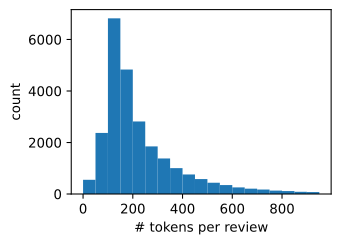
在词元化之后,让我们绘制评论词元长度的直方图。
d2l.set_figsize()
d2l.plt.xlabel('# tokens per review')
d2l.plt.ylabel('count')
d2l.plt.hist([len(line) for line in train_tokens], bins=range(0, 1000, 50));
d2l.set_figsize()
d2l.plt.xlabel('# tokens per review')
d2l.plt.ylabel('count')
d2l.plt.hist([len(line) for line in train_tokens], bins=range(0, 1000, 50));
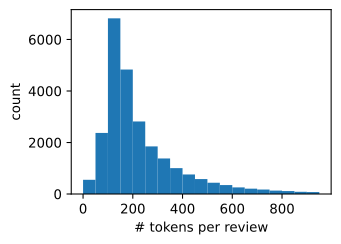
正如我们所料,评论的长度各不相同。为了每次处理一小批量这样的评论,我们通过截断和填充将每个评论的长度设置为500。这类似于 9.5节中对机器翻译数据集的预处理步骤。
num_steps = 500  # 序列长度
train_features = np.array([d2l.truncate_pad(
    vocab[line], num_steps, vocab['<pad>']) for line in train_tokens])
print(train_features.shape)
(25000, 500)
num_steps = 500  # 序列长度
train_features = torch.tensor([d2l.truncate_pad(
    vocab[line], num_steps, vocab['<pad>']) for line in train_tokens])
print(train_features.shape)
torch.Size([25000, 500])
15.1.3. 创建数据迭代器
现在我们可以创建数据迭代器了。在每次迭代中,都会返回一小批量样本。
train_iter = d2l.load_array((train_features, train_data[1]), 64)

for X, y in train_iter.create_tuple_iterator():
    print('X:', X.shape, ', y:', y.shape)
    break
print('小批量数目:', train_iter.get_dataset_size())
X: (64, 500) , y: (64,)
小批量数目: 391
train_iter = d2l.load_array((train_features,
    torch.tensor(train_data[1])), 64)

for X, y in train_iter:
    print('X:', X.shape, ', y:', y.shape)
    break
print('小批量数目:', len(train_iter))
X: torch.Size([64, 500]) , y: torch.Size([64])
小批量数目: 391
15.1.4. 整合代码
最后,我们将上述步骤封装到load_data_imdb函数中。它返回训练和测试数据迭代器以及IMDb评论数据集的词表。
#@save
def load_data_imdb(batch_size, num_steps=500):
    """返回数据迭代器和IMDb评论数据集的词表"""
    data_dir = d2l.download_extract('aclImdb', 'aclImdb')
    train_data = read_imdb(data_dir, True)
    test_data = read_imdb(data_dir, False)
    train_tokens = d2l.tokenize(train_data[0], token='word')
    test_tokens = d2l.tokenize(test_data[0], token='word')
    vocab = d2l.Vocab(train_tokens, min_freq=5)
    train_features = [d2l.truncate_pad(
        vocab[line], num_steps, vocab['<pad>']) for line in train_tokens]
    test_features = [d2l.truncate_pad(
        vocab[line], num_steps, vocab['<pad>']) for line in test_tokens]
    train_labels = np.array(train_data[1], dtype=np.int32)
    test_labels = np.array(test_data[1], dtype=np.int32)
    train_iter = d2l.load_array((train_features, train_labels), batch_size)
    test_iter = d2l.load_array((test_features, test_labels),
                            batch_size,
                            is_train=False)
    return train_iter, test_iter, vocab
#@save
def load_data_imdb(batch_size, num_steps=500):
    """返回数据迭代器和IMDb评论数据集的词表"""
    data_dir = d2l.download_extract('aclImdb', 'aclImdb')
    train_data = read_imdb(data_dir, True)
    test_data = read_imdb(data_dir, False)
    train_tokens = d2l.tokenize(train_data[0], token='word')
    test_tokens = d2l.tokenize(test_data[0], token='word')
    vocab = d2l.Vocab(train_tokens, min_freq=5)
    train_features = torch.tensor([d2l.truncate_pad(
        vocab[line], num_steps, vocab['<pad>']) for line in train_tokens])
    test_features = torch.tensor([d2l.truncate_pad(
        vocab[line], num_steps, vocab['<pad>']) for line in test_tokens])
    train_iter = d2l.load_array((train_features, torch.tensor(train_data[1])),
                                batch_size)
    test_iter = d2l.load_array((test_features, torch.tensor(test_data[1])),
                               batch_size,
                               is_train=False)
    return train_iter, test_iter, vocab
15.1.5. 小结
情感分析研究人们在文本中的情感,这被认为是一个文本分类问题,它将可变长度的文本序列进行转换转换为固定长度的文本类别。
经过预处理后,我们可以使用词表将IMDb评论数据集加载到数据迭代器中。
15.1.6. 练习
我们可以修改本节中的哪些超参数来加速训练情感分析模型?
请实现一个函数来将Amazon reviews的数据集加载到数据迭代器中进行情感分析。